Reverse Engineer Anything: Is AI Breaking Big Software's Moat?

Research checked on 4 November 2026. This is a source-based analysis, not a hands-on review of the ArtCraft apps. The cover is an original AI-assisted editorial illustration.
You open a creative suite to do one small job. Remove a background. Adjust a few colours. Export an asset. Somewhere between the subscription screen and the fifth panel you do not need, a reasonable question appears: why does this task require an entire software empire?
That question is becoming harder for the industry to ignore. AI coding agents can help developers build alternatives, and a repository called Reverse Engineer Anything, or REA, gives those agents tools to investigate how existing software behaves. Alongside it, projects such as ArtCraft are putting familiar creative workflows into independent applications.
There is a substantial competitive threat here. There is also a lot of storytelling that outruns the evidence. REA did not make every alternative that appeared beside it, an impressive demo does not establish professional reliability, and Adobe's reported revenue has not collapsed. The interesting story is which parts of the software business AI makes easier to challenge.
The short answer: Reverse Engineer Anything helps coding agents investigate software behaviour. That can help a developer build a focused alternative, but it does not automatically recover an entire product or prove that a replacement is dependable. This guide looks at the documented examples, the Adobe-alternative debate and a practical way to judge the results yourself.
What Reverse Engineer Anything actually does
Think of REA as an investigation workbench for a coding agent. Its official repository describes tools for examining native programs, JavaScript and Electron applications, .NET assemblies and websites. Depending on the target, the agent can inspect instructions, decompiled representations, modules, calls and other evidence. Native analysis can connect to tools such as Ghidra or Hopper.
The developer asks a focused question, the agent follows the relevant evidence, and the findings can inform an explanation or a new implementation. That is more useful than asking a model to guess how an unfamiliar feature works from a screenshot. It still needs human judgement and tests. A compiled program does not magically turn back into its original, documented source tree.
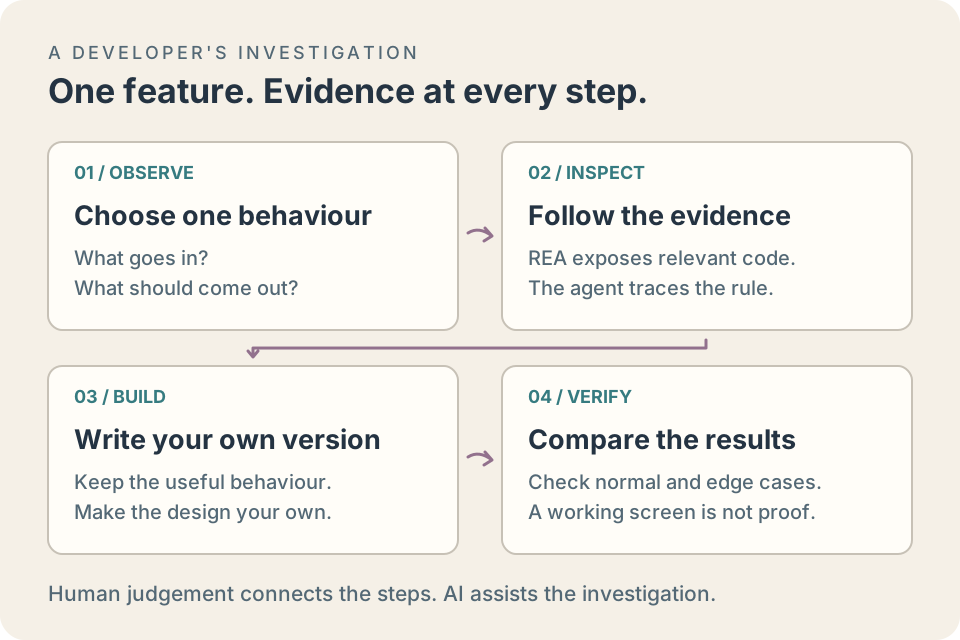
The useful loop is small enough to check. REA supplies evidence; the developer and coding agent turn it into an implementation and test it.
The cool REA projects with evidence behind them
The best examples are more specific than a headline promising to clone an entire application. REA's published investigations show why that specificity matters:
- DX-Ball's sound positioning. An ongoing reconstruction project traced how a brick's position becomes stereo sound panning. The published case study reports 3,205 comparisons with the original x86 function and a match for all 63 compiled function bytes. That is evidence for a recovered function, not proof that the whole game is finished.
- Notion's rich-text clipboard. The Electron investigation follows a copy operation from the page-facing API through process boundaries to the system clipboard. It explains a particular workflow rather than claiming to recreate Notion's servers or collaboration service.
- Windows Calculator and Chrome's dinosaur game. The official interactive examples explain percentage-button behaviour and investigate the dinosaur's increasing speed. These are approachable examples of finding a rule before trying to reproduce it.
- Older game mechanics and Android behaviour. The showcase directory also covers TH04's aimed bullet patterns and the code-generation rule in the open-source Aegis authenticator. The scope is a documented mechanism, not an assertion that an entire product has been replaced.
These are useful starting points for preservation, interoperability and understanding software. They also show a better standard for evaluating viral claims: what was examined, what was rebuilt, and how was the result checked?
How to start a useful AI reverse-engineering investigation
Start with a question whose answer you can check. “Recreate this whole editor” leaves too much room for an agent to invent missing behaviour. “Find how this local sample app stores the layer opacity value” gives the investigation a boundary and an observable result. The following is a suggested working method, not a benchmark we ran for this article.
- Choose one behaviour and a suitable target. Use a small program you wrote, an appropriately licensed sample or software you have permission to examine. Record the version, operating system, input and expected output. Keep a copy of the original test files.
- Connect the investigation tools. Follow REA's official setup guide for your coding agent and target. Review the setup changes and verify the connection before analysing anything. The tools needed for a native executable differ from those needed for JavaScript.
- Ask for evidence before a rewrite. Request the relevant function or module, the path that reaches it, the values it reads and any uncertainty in the explanation. A plausible-looking snippet is not enough to establish what the original program does.
- Write down the rule in plain language. Specify inputs, outputs, rounding, failure cases and assumptions. For example, does an opacity value represent a fraction, a percentage or a byte? What happens outside the normal range?
- Build and compare a small implementation. Test ordinary inputs, boundary values and malformed inputs where appropriate. Record mismatches. Keep “this function matches our cases” separate from “the application works.”
A useful investigation prompt might be:
Investigate how my local sample editor converts layer opacity into its saved value. Identify the relevant code and show the evidence. Explain rounding and edge cases, separate observations from assumptions, and propose comparison tests before writing a replacement.
The most valuable output may be a short specification and a list of unanswered questions. That gives a human reviewer something concrete to challenge and a developer something smaller to implement.
What about the Adobe alternatives everyone is sharing?
ArtCraft and REA belong in the same conversation, but their provenance should not be merged. ArtCraft describes its applications as independent, open-source tools; PhotoCraft's repository calls it a clean-room Photoshop reimplementation. These are examples of the broader wave of AI-assisted software development, not verified examples of applications produced by REA. Similar release timing is not evidence of a shared build process.
The official ArtCraft directory makes the ambition easy to see. Its creative applications address familiar jobs:
- PhotoCraft / Photoshop: raster editing, layers, masks and adjustments.
- VectorCraft / Illustrator: vector illustration, paths and editable shapes.
- FilmCraft / Premiere Pro: timeline-based video editing.
- LightCraft / Lightroom: photo-library organisation and raw development.
- EffectCraft / After Effects: motion graphics and visual effects.
- DesignCraft / InDesign: page layout and publishing.
- PdfCraft / Acrobat: reading, arranging and working with PDF documents.
Those pairings describe the type of work each app targets. They are not a feature-parity scorecard. ArtCraft also lists WordCraft, GridCraft and DeckCraft for office work, showing how the same challenge extends beyond Adobe.
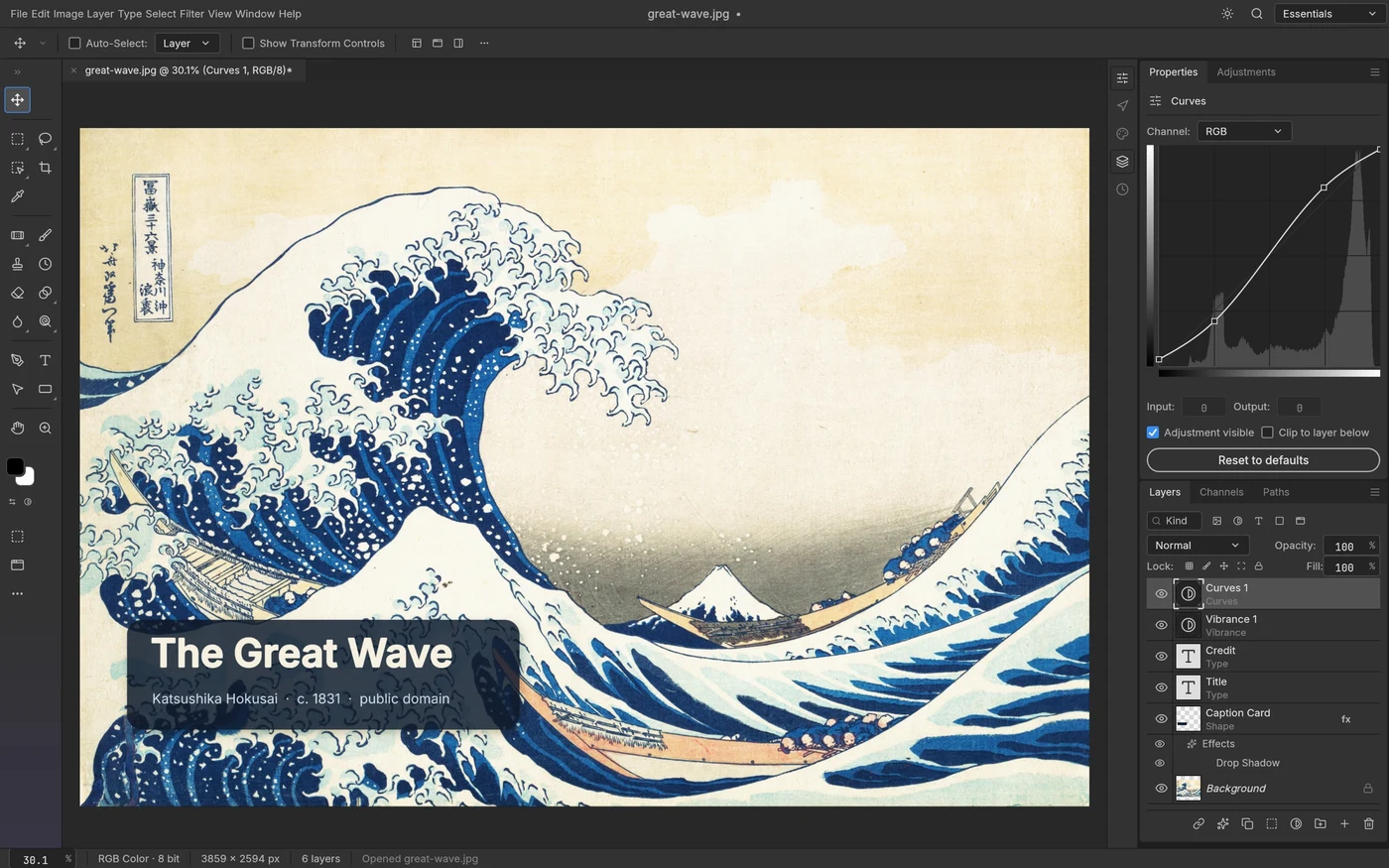
PhotoCraft's own published screenshot, not a generated mockup. Screenshot: ArtCraft Team and PhotoCraft contributors, MIT licence. Artwork: Katsushika Hokusai's The Great Wave off Kanagawa, public domain. Original source and project status.
PhotoCraft is an especially tangible example because its authors document layers, masks and layered PSD support. Its README also labels the project early alpha. Both details matter. A familiar interface can lower the learning barrier, but a supported file extension does not guarantee that every real client document will survive a round trip intact.
How to evaluate an Adobe alternative before switching
Try a representative job from your own work before treating a feature list as a migration plan. A thumbnail creator and a print-production studio can reach different conclusions about the same app without either being wrong. Use copies of your files and keep your existing delivery workflow available while you evaluate.
Test the complete file round trip
Opening a layered file is only the first step. Make an edit, save it, close the application, reopen it and inspect the result in the receiving application. Check whether text is still editable, masks stay aligned, blend modes render correctly, embedded images remain available and dimensions stay exact. Repeat with the features your actual projects use.
For a concrete trial, make a small layered document containing a background, editable text, a masked image and an adjustment. Change one element in the candidate editor, then return the file to its original application. Keep a flattened reference image for visual comparison, but inspect the layers too: a file can look right because its editable structure was flattened away. This is a proposed evaluation exercise, not a compatibility result for PhotoCraft.
Adobe's Photoshop file-format documentation explains that formats preserve different document properties. That is why “supports PSD” and “preserves the parts of my PSD that I need” are separate questions. A PNG export can be a perfectly good final image while being an unsuitable replacement for an editable working file.
Measure the job, including recovery
Time a task from import to delivery, including the awkward steps. Count manual fixes, missing fonts, export adjustments and time spent finding a workaround. Then test undo, save, close and reopen. If recovery from a mistake is unreliable, a fast demonstration may still become an expensive working day.
Check who will maintain the tool
Read the release notes, known limitations and issue discussions. Look for reproducible bug reports and explanations of what was fixed. A repository's popularity measures attention; your decision depends on whether a released version handles your job on your hardware. An active project can still be early software.
For occasional personal work, tolerating a rough edge may be reasonable. For a deadline with collaborators, the ability to exchange files and recover work deserves more weight. The useful question is “Can this tool complete my repeatable workflow?”, followed by “What happens when it cannot?”
How AI puts pressure on a software giant
The following is an economic argument drawn from these examples, not a claim that the projects have already displaced a measurable share of Adobe's customers.
1. A rival can start with the job people actually need
A new editor does not have to reproduce every obscure command to be useful to somebody. A student making a poster, a developer preparing game sprites and an agency delivering print-ready files have very different requirements. If a focused alternative handles the first two jobs well, it can win those users while remaining unsuitable for the third.
AI assistance can reduce the effort of exploring an implementation, writing routine code and iterating on tests. REA adds a way to inspect selected behaviours instead of relying on guesswork. Neither removes engineering work, but together they make smaller, more targeted experiments plausible.
2. The bundle becomes easier to question
The incumbent's strongest offer is often a connected suite. The occasional user's strongest objection is paying for a suite when they need one task. Free, open-source or narrowly priced tools can make that mismatch more visible. The competitive opening is the gap between what the customer needs to finish and what the bundle asks them to buy.
This does not prove that subscriptions will disappear. It gives customers another comparison to make. A company may need to justify its price through speed, reliable output, collaboration and support, rather than simply having the only recognisable interface.
3. Familiar workflows reduce the cost of trying something else
Habits are part of a product's defence. People know where the tools live, which shortcuts to press and what a saved document should contain. A competing app that respects familiar interactions and supports useful interchange formats can make experimentation less disruptive. An isolated clone of a toolbar is much less valuable than a workflow that takes a real file in and delivers a dependable result.
4. Open code creates room for tools the giant would never prioritise
A small community may care about a particular operating system, an accessibility improvement or one awkward export format. An open project lets contributors pursue those needs without waiting for a large vendor's roadmap. AI can help with that work, but maintainers still have to review changes, handle security issues and keep releases working. Cheap code generation does not make long-term stewardship free.
The fact that complicates the “Adobe is finished” story
Adobe's own Q3 FY2026 earnings release, dated 10 September 2026, reported $6.76 billion in quarterly revenue, up 13% year over year, and $27.50 billion in annualised recurring revenue. It also reported growth of more than 150% in its AI-first ARR measure.
Those are company-reported results for a quarter ending before much of the October discussion. They neither measure ArtCraft's later impact nor settle the long-term competitive question. They do establish that “AI has already destroyed Adobe's business” is not supported by these figures. Incumbents can sell AI features too.
There are durable reasons professionals stay with established software: trusted file handling, colour and print workflows, specialist plug-ins, team habits, support and the cost of a failed delivery. A freelancer losing an afternoon to a corrupted project may care more about reliability than the purchase price. Reproducing a useful feature and replacing that whole working relationship are different engineering and business problems.
The better claim is that AI is challenging the assumption that familiar software behaviour is expensive to compete with. How much revenue moves will depend on whether alternatives turn promising demonstrations into tools people trust for repeated work.
What AI cannot reproduce from a desktop interface
An interface exposes only part of a product. A desktop app may depend on a remote service for shared documents, permissions, search, synchronisation or account management. Understanding one client's request does not recreate the service's data, operations or reliability. REA's Notion clipboard case is useful precisely because it identifies a local workflow with a clear scope.
There is also a difference between AI used to build an application and AI required to run it. The first describes the development process; the second describes a dependency the user may need every day. Before adopting a tool, ask whether its core workflow works offline, which features call external services and what happens if an account or model endpoint becomes unavailable.
Local analysis and a private end-to-end workflow are separate questions too. REA's repository says analysis runs locally, while the coding agent receives its results under the model provider's data policy. For confidential work, check the agent's configuration and relevant service policies before supplying proprietary files or analysis output.
A side note from building EzPix: better can mean a shorter workflow
That is also the thinking behind EzPix, GlitchBong's online pixel studio. For someone moving from a browser image to a small pixel asset, the useful comparison is the number of steps between the source and an editable result. EzPix pairs the web editor with EzPIX Insta, its Chrome extension, to make that route more direct.
Capture visible page content or open local media, compare input and output, isolate a region with Magic colour selection, and refine it using Add, Remove, lasso or brush controls. The expanded workspace gives selections more room. Export the cutout locally or send the converted preview to the web editor for drawing, layers and animation.
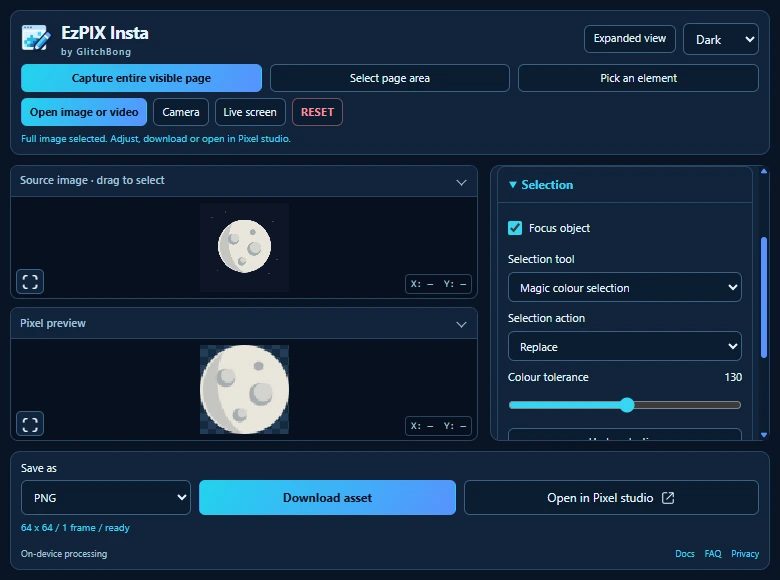
A real local EzPIX Insta capture using an original moon fixture. Colour tolerance 130 includes the moon's grey areas while excluding the dark sky. Open the example image to try it yourself.

For this browser-to-pixel task, the integrated capture, selection and handoff tools can be a better fit than moving through separate capture, conversion and desktop-editing steps. That is a specific advantage, not a claim that EzPix beats every pixel editor at every job. Magic selects connected colours; it is not AI object recognition. EzPix's image processing is local and deterministic, with no runtime AI or image upload.
What to watch next
Watch what happens after the first impressive screenshot. Do independent users keep their files intact? Do bug reports get resolved? Can contributors maintain the code they generate? Can a small tool finish an important job more conveniently than a giant bundle?
REA makes software behaviour easier to investigate. AI-assisted projects make familiar tools easier to challenge. The human work is deciding what matters, proving that it works, and making it pleasant to use. The giants have not been overthrown. They do have more reasons to earn the next subscription.
FAQ
Did Reverse Engineer Anything create the Adobe alternatives?
The Adobe-style examples discussed here are ArtCraft projects. They should not be credited to REA without evidence connecting the build process. REA's own documented case studies cover specific software behaviours and reconstructions.
Can REA recover the original source code of any program?
No. Available evidence depends on the target and its tooling. Decompiled representations, instructions and module relationships can help explain behaviour, but they are not a guaranteed recovery of the original source, comments, infrastructure or complete application.
Can an AI-built editor replace Photoshop for professional work?
That depends on the released editor and the work you need to deliver. Evaluate editable file exchange, colour handling, typography, required plug-ins, recovery and support using copies of representative projects. PhotoCraft's maintainers describe it as early alpha; this article does not establish professional feature parity.
Does using REA keep everything away from AI services?
No such guarantee follows from local analysis. REA runs its analysis locally, but the connected coding agent receives the results. Check where that agent runs and its provider's data policy before using confidential material.
Does reverse engineering make a proprietary app open source?
No. Inspecting behaviour does not change the original application's licence or grant ownership of its code and assets. Use software you are authorised to examine and check the permissions relevant to your project. A project's clean-room description is its stated development approach, not a universal legal clearance. The EFF's U.S. reverse-engineering FAQ explains why the legal context matters.
Does EzPix use AI to select objects?
No. EzPix uses deterministic image processing. Magic colour selection matches connected colours within a tolerance, and the other selection tools let you add or remove areas manually.
Further reading: follow the question that interests you
- “I want to try a small investigation.” Start with the official REA getting-started guide, then read the DX-Ball sound-pan investigation for an example of tracing evidence and checking a reconstruction.
- “I want to judge the Photoshop-alternative claims.” Read PhotoCraft's README and status section alongside Adobe's file-format reference. Use them to design your own import-edit-save-reopen trial.
- “I am interested in interoperability.” The Notion clipboard case study follows a concrete operation across an Electron application's process boundaries.
- “I only need a smaller creative workflow.” Explore the EzPIX Insta extension guide and EzPix documentation for local capture, selection and pixel-art editing.
- “Why do apparently similar systems behave differently?” Our SQL dialects guide looks at another compatibility problem: familiar syntax can hide differences that matter when work moves between systems.
Sources and editorial notes
Product descriptions above come from their maintainers. They are not independent performance benchmarks or a promise of complete compatibility. Business implications and the suggested evaluation exercises are this article's analysis. Sources were checked on 4 November 2026. GlitchBong develops EzPix, which is included as our own example of a focused tool.
- REA's official repository and project website: purpose, supported investigations and worked examples.
- REA case studies, especially DX-Ball and Notion: evidence and scope of reconstructions.
- ArtCraft's application directory and PhotoCraft's repository: intended workflows, project status and the screenshot used here.
- REA setup guide: connecting a coding agent and choosing an initial investigation.
- Adobe's Photoshop file-format reference: document properties and format-specific preservation limits.
- Adobe's Q3 FY2026 earnings release, filed with the SEC: company-reported business results.
- EzPix documentation and Chrome extension guide: current capture, selection, transfer and processing behaviour.